Unapproved procedures
View unapproved procedures and costs
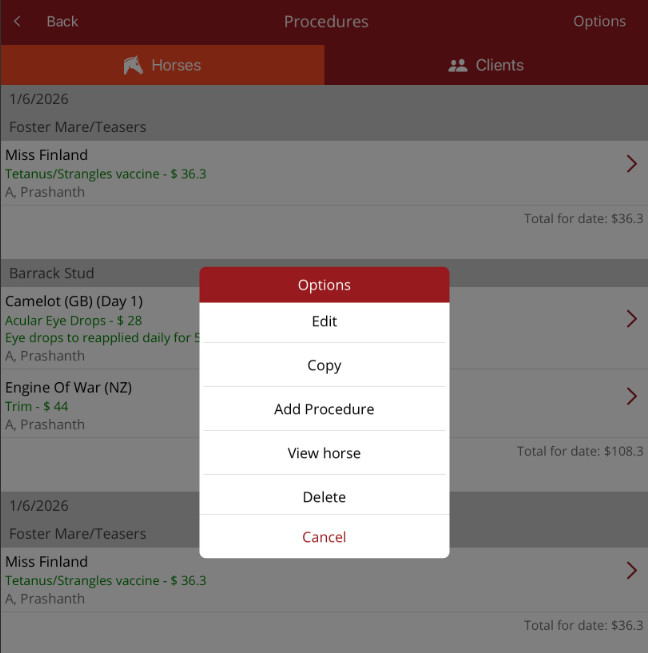
Unapproved procedures is found under Procedures on the Home page. This option allows you to view the procedures waiting to be approved and the cost for each procedure. There is also a total for the day (this is permission based. Not all users will the see the costs).
The procedures are broken down into two tabs
- Horses
- Clients
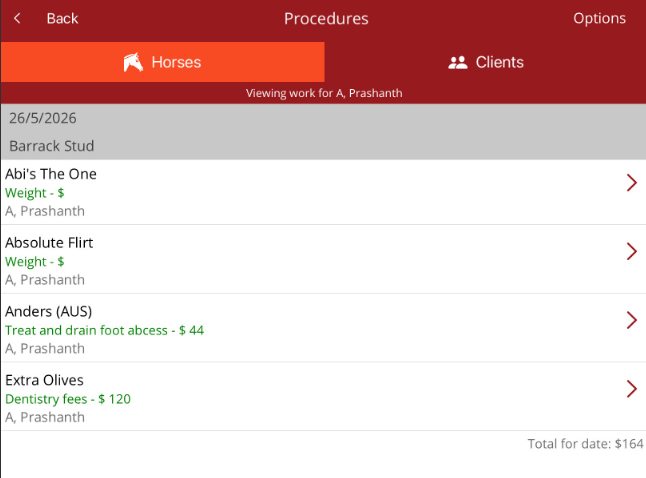
If there is a practitioner filter turned on, then the list will only show procedures for that practitioner. A message will appear on the top indicating that a filter is on and which practitioner it is for. If you need to see all procedures, go to Filter on the top right, select the practitioner filter and select None. All procedures will then be displayed.
By tapping on a procedure, the Options menu will be displayed
- Edit - edit the procedure
- Copy - copy the procedure then make required changes
- Add procedure - will open the Add procedure screen defaulted to the horse selected
- View horse - view the horse profile
- Delete - delete the procedure