Adding a Practitioner filter
Manage task lists by practitioner
The practitioner filter allows a user to be able to see work assigned to a practitioner for task management. When the practitioner filter is set, only work assigned to the selected practitioner will be displayed under Procedures and in the calendar.
The Practitioner filter can be set two ways
1. When a default Practitioner is selected under
- Procedures
- Work
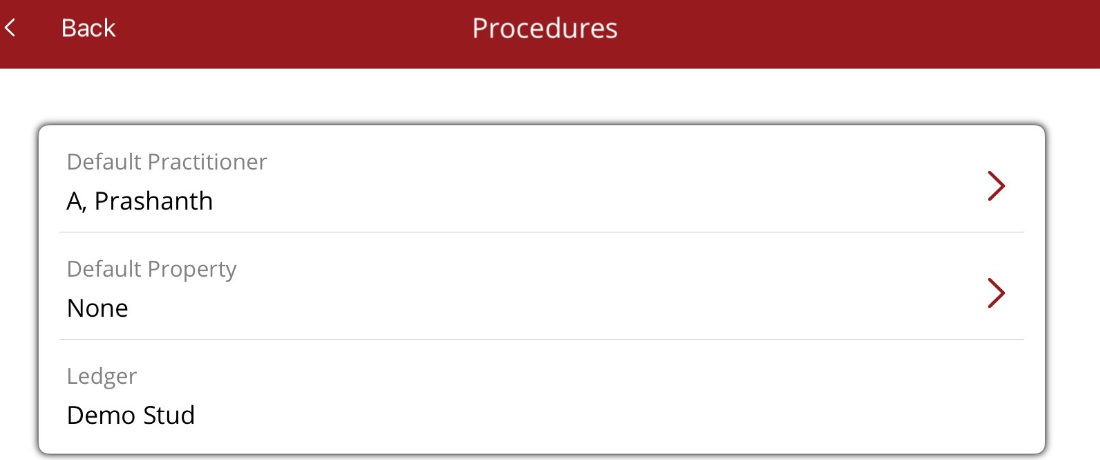
2.Using the Options/Filter menu
- Via the Options/Filter menu select Practitioner and chose the practitioner's name.
- Once added the filter will appear as Practitioner (1) on the filter menu.
Once a practitioner filter is set, a user will see a message indicating they are viewing work for the practitioner. The message is seen in
- Horse profile/Procedure tab
- Full Calendar
- Full calendar - Agenda List
- Procedures/Procedure Schedule
- Procedures/Unapproved Procedures

To reset the filter either
- change the default practitioner to None or
- Under Option/Filter select Practitioner (1) and change the Practitioner to None.
- Under Option/Filter, scroll to the bottom of the list and Reset Filter