Bookings
View bookings taken for a stallion
Under Breeding on the Home Page select Bookings. Under this option, you can view mares that are booked to stallions. You can browse the list by Stallion, Owner, or Agent, and use the Options menu to filter and sort the results.
At the top of the screen, tap one of the three tabs to change how the list is grouped:
- Stallion — Groups mares by the stallion they are booked to (default view)
- Owner — Groups mares by the owner
- Agent — Groups mares by the agent managing the booking
In the Search bar above the list, search for a specific mare, owner, agent, or stallion.
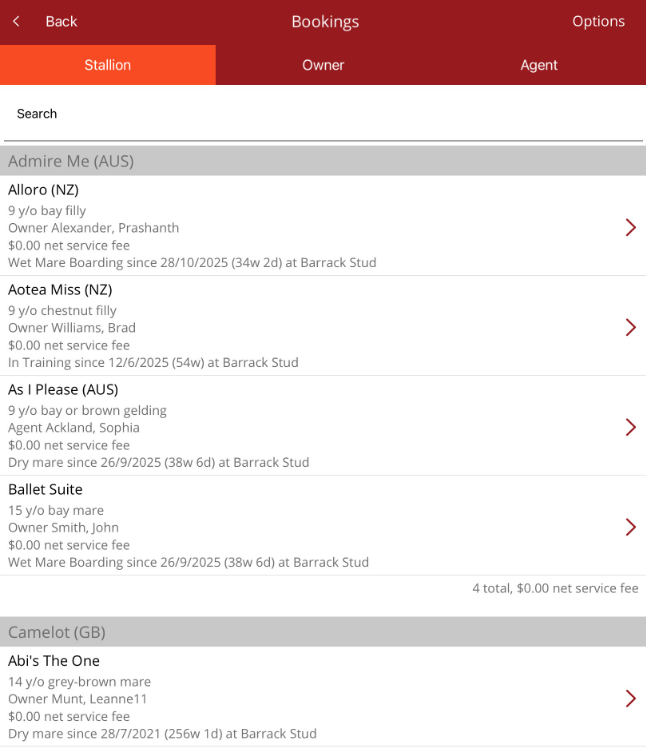
- Each mare in the list displays the following information:
- Mare name and country of origin (e.g., NZ, AUS, GB)
- Age, colour, and sex (e.g., 9 y/o bay filly)
- Owner or Agent name
- Net service fee
- Current status and location — including how long the mare has been at the stud
- Mares are grouped under their booked stallion, with a summary line at the bottom of each stallion group showing the total number of bookings and total net service fee.
- Tap any mare in the list to be able to view the mare or owner's profile page.
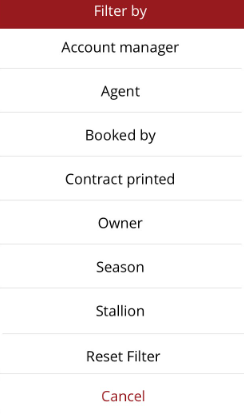
In the Options menu in the top right hand corner, you can use a filter to narrow down the list or sort by ascending or descending order. Filter by one of the following: