Serve/Cover schedule
The Cover/Serve Schedule found under Breeding on the Home Page gives you a day-at-a-glance view of your stallions so you can quickly see which mares are booked in, shortlisted mares still waiting to be added, and which may need to be rescheduled.
Navigating the Serve Schedule
Open the Serve Schedule screen to see all stallions on the serve schedule for the selected date. Each stallion is listed down the left-hand side, with the day's covering timeslots (e.g. 06:00 AM, 11:00 AM, 04:00 PM, 08:00 PM) displayed across the top.
- Use the arrows either side of the date to move between days.
- Use the Search stallion... field to quickly find a specific stallion.
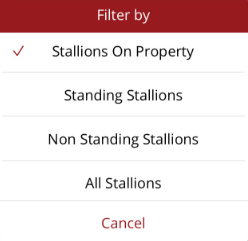
- In the Options menu in the top right hand corner filter the schedule by one of the following
Understanding the timeslots
Each cell in the grid represents a timeslot for a stallion.
- Yellow border — There are shortlisted mares for this stallion that have not yet been added to a timeslot.
- Grey border — There are no shortlisted mares waiting for this stallion.
Adding shortlisted mares to a timeslot
Tap on a timeslot to view the mares shortlisted for that stallion. From here you can add a shortlisted mare directly into the stallion's timeslot.
Viewing the Mares to be Served report
Tap on a time in the header row (e.g. 06:00 AM) to open the Mares to be Served report for that time slot.
To view the report for the date, go to Options in the top right hand corner and select the Summary report
Stallion options
Tap on a stallion's name to choose between:
- View stallion — Opens the stallion's profile page.
- View shortlisted mares — Displays the mares currently shortlisted for that stallion. This list can be used to check all shortlisted mares for the day have been allocated to a timeslot. If all timeslots are full and there are still mares on the shortlist they will have to be moved to another day or a different stallion.